> ## Documentation Index
> Fetch the complete documentation index at: https://docs.soroswap.finance/llms.txt
> Use this file to discover all available pages before exploring further.
# Installing Freighter
> Installing the Freighter browser wallet, securing the recovery phrase, and choosing which Stellar network to use.
In this section, we will guide you through the installation process of Freighter, a non-custodial Stellar wallet extension that will empower you to engage with Soroswap.Finance
## Step 1: Installing Freighter on your Browser
Freighter works as a Extension in Chrome (Google Chrome, Brave) and Firefox:
1. Visit the [Freighter Official Website](https://www.freighter.app/), to install Freighter into your browser.
2. Click on "Create Account" and choose a secure password.
## Step 2: Safeguarding Your Wallet
Upon creating your account, you will be presented with a secret recovery phrase. This phrase acts as a backup for your wallet's private key, allowing you to restore your wallet in case of loss, theft, or device damage.
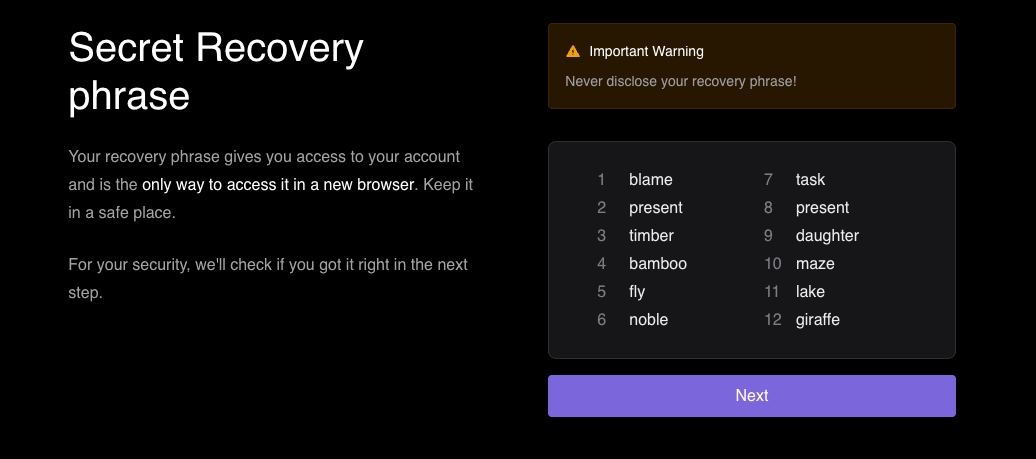 Follow these important guidelines to protect your funds:
* **Save the Seed Phrase**: Keep your seed phrase in a safe place. Treat it as a valuable key to your funds and store it confidentially.
* **Secure Storage**: Store the seed phrase in a secure location, such as a locked drawer or a password-protected digital storage solution. Ensure it is shielded from unauthorized access and potential loss.
* **Exercise Caution**: Remember, anyone with access to your seed phrase can gain control over your wallet and its contents. Take the necessary precautions to safeguard it diligently.
## Step 3: Confirming Your Seed Phrase
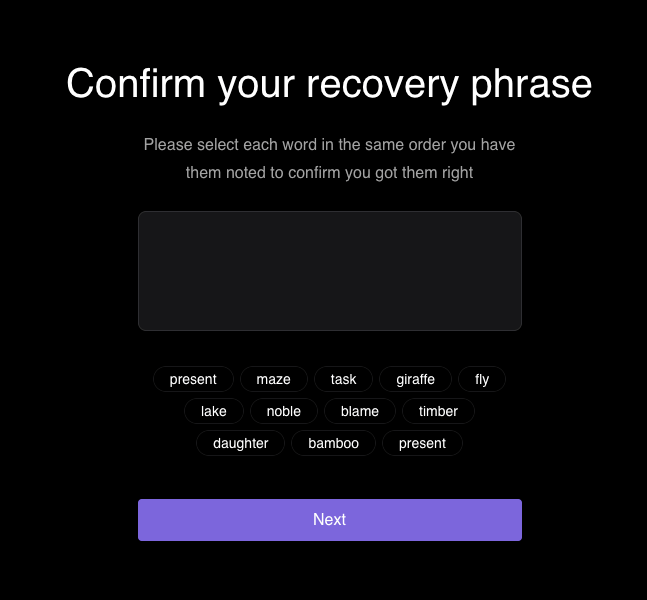
To ensure accuracy, you will be asked to confirm your seed phrase in the same order. This step guarantees that you have correctly noted down your recovery phrase.
Follow these important guidelines to protect your funds:
* **Save the Seed Phrase**: Keep your seed phrase in a safe place. Treat it as a valuable key to your funds and store it confidentially.
* **Secure Storage**: Store the seed phrase in a secure location, such as a locked drawer or a password-protected digital storage solution. Ensure it is shielded from unauthorized access and potential loss.
* **Exercise Caution**: Remember, anyone with access to your seed phrase can gain control over your wallet and its contents. Take the necessary precautions to safeguard it diligently.
## Step 3: Confirming Your Seed Phrase
To ensure accuracy, you will be asked to confirm your seed phrase in the same order. This step guarantees that you have correctly noted down your recovery phrase.
 ## Step 4: Accessing Your Wallet
Congratulations! You are now ready to use your Freighter wallet. Follow these final steps:
1. Open the Freighter extension in your browser.
## Step 4: Accessing Your Wallet
Congratulations! You are now ready to use your Freighter wallet. Follow these final steps:
1. Open the Freighter extension in your browser.
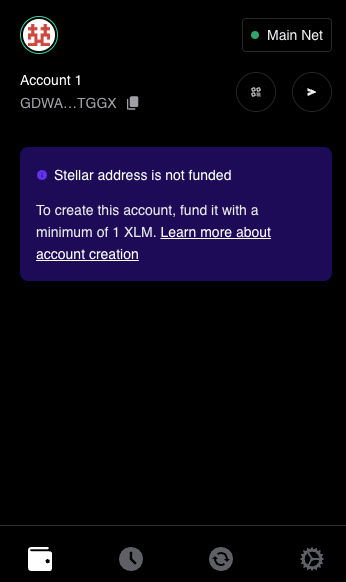 2. Your account will be displayed, labeled as "Account 1," along with your unique account address. This address serves as an identifier for receiving funds or transactions from other users or entities on the blockchain network.
## Step 5: Choosing a Network
Soroban is the smart contract environment of Stellar, not a separate network, so there is nothing extra to enable in Freighter. All you need to do is pick which network your wallet connects to.
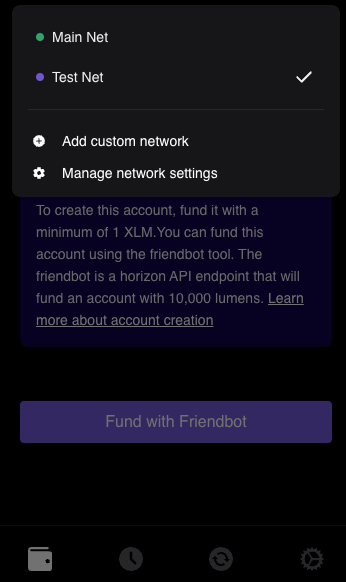
1. Open Freighter's network selector and choose a network:
* **Mainnet**: the live Stellar network, where transactions move real funds.
* **Testnet**: a test network with no real value, meant for experimenting.
2. Soroswap is live on Mainnet. This tutorial uses Testnet so you can explore every feature without risking real funds.
2. Your account will be displayed, labeled as "Account 1," along with your unique account address. This address serves as an identifier for receiving funds or transactions from other users or entities on the blockchain network.
## Step 5: Choosing a Network
Soroban is the smart contract environment of Stellar, not a separate network, so there is nothing extra to enable in Freighter. All you need to do is pick which network your wallet connects to.
1. Open Freighter's network selector and choose a network:
* **Mainnet**: the live Stellar network, where transactions move real funds.
* **Testnet**: a test network with no real value, meant for experimenting.
2. Soroswap is live on Mainnet. This tutorial uses Testnet so you can explore every feature without risking real funds.
 ## Step 6: Let's Dive into the Tutorial
Congratulations! You are now fully equipped to embark on an exciting journey with Soroswap on the testnet. Get ready to explore and make the most of Soroswap's comprehensive range of features within this secure testing environment. Let's dive right into the tutorial and unlock the full potential of your Soroswap experience!
## Step 6: Let's Dive into the Tutorial
Congratulations! You are now fully equipped to embark on an exciting journey with Soroswap on the testnet. Get ready to explore and make the most of Soroswap's comprehensive range of features within this secure testing environment. Let's dive right into the tutorial and unlock the full potential of your Soroswap experience!